
Axon Chat and Automated Report Refresh
This is one of the biggest releases we have shipped. Axon Chat brings messaging into Axon HQ and the Axon Pulse app: staff and athletes talk in one place the club controls, every team gets its own channel, and guardians of under 18s are included by the system. Automated Report Refresh means a published report keeps its own data up to date, on a schedule or on demand, with no rebuilding and no republishing. Alongside the two, a set of smaller improvements to Forms, Athlete Management and User Management.
Major releases
Axon Chat: Messaging built into Axon HQ and the Axon Pulse app. Staff and athletes talk one to one, in groups, and in a channel for every team and group, with guardians of under 18s included automatically.
Automated Report Refresh: Published reports now keep their own data up to date, on a schedule or at the press of a button. No rebuilding, no republishing.
Also in this release
Report notifications: Get a notification in Axon HQ and Axon Pulse when a new or updated report is sent to you.
Forms improvements: See who has and has not responded at a glance, duplicate a form template, and tell form sends apart in My Forms.
Usernames on athlete and user lists: Usernames now sit next to email addresses, with a copy button on every row.
Profile pictures for staff: Staff can now upload their own profile picture.
No more clearing the cache after an update: HQ no longer needs a cache clear to work properly after a release.
Axon Chat (New, major release)
Messaging built into Axon HQ and the Axon Pulse app. Staff and athletes talk one to one, in groups, and in a channel for every team and group, with guardians of under 18s included automatically.
What it does. Chat works in Axon HQ on the desktop and in Axon Pulse on the athlete's phone. Start a direct message or a group chat with anyone your organisation allows you to reach. Every team and group in Athlete Management gets its own channel without anyone setting it up, and the channel follows the membership: move a player to the Academy and they move channel within seconds, rename or archive a team and its channel follows. Guardians of athletes under 18 are added by the system, not by someone remembering to. Start a group chat with a whole team or group in one go. Read receipts show who has seen a message, and Message info lists who it has reached and who has read it. A guardian reading a message never counts as the athlete reading it. Share files, see unread counts beside Chat and in Notifications, add a group picture, mute a busy conversation, and use @channel to reach every member, including anyone who has muted it. Messages are kept under your organisation's retention policy, and the safeguarding lead and the Owner can review conversations, with every review logged. Admins decide who can message whom, who can create groups and use @channel, and which channels are switched on.
Why it matters. Most squads run on group chats on personal phones. None of it sits with the athlete record, the club does not keep it, and in an academy a coach messaging a 16 year old on a personal phone is exactly what safeguarding guidance tells clubs not to do. Everyone knows that. It carries on because nothing better was ever on the athlete's phone. Pulse already is. Chat is one channel the club controls, with guardians copied in by the system, and the squad already organised into the same teams and groups you use everywhere else in HQ. When the forwards coach moves a session at 7am, the Forwards channel is already there, with the right people in it.
Where to find it. Chat, in the left-hand menu in HQ, and in the Axon Pulse app. Admins manage who can message whom, @channel and the team channels in Settings > Chat Settings
Axon Chat in Axon HQ
On the desktop, Chat sits in the left-hand menu. One list holds your direct messages, group chats and team channels, with filters and unread counts. The details panel shows who is in a conversation, including any guardians, the files and videos shared, mute and the record keeping note. Click the receipt under a message to open Message info and see exactly who it has reached and who has read it. Admins set the rules in Settings > Chat Settings.
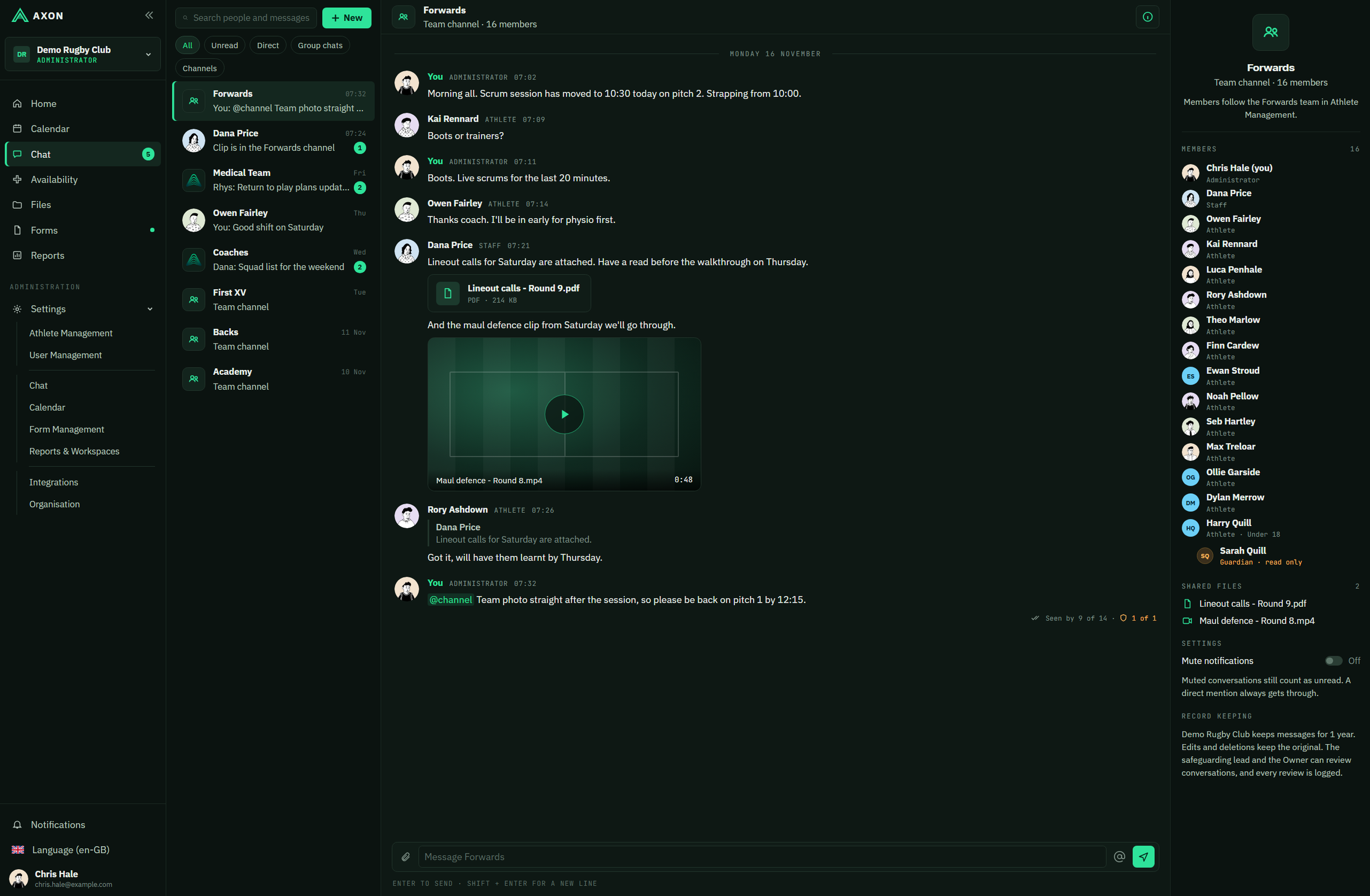
The Forwards team channel in HQ. Members follow the team, a guardian is included for an under 18, and the thread has a file, a video, a reply and @channel. Demo club and people
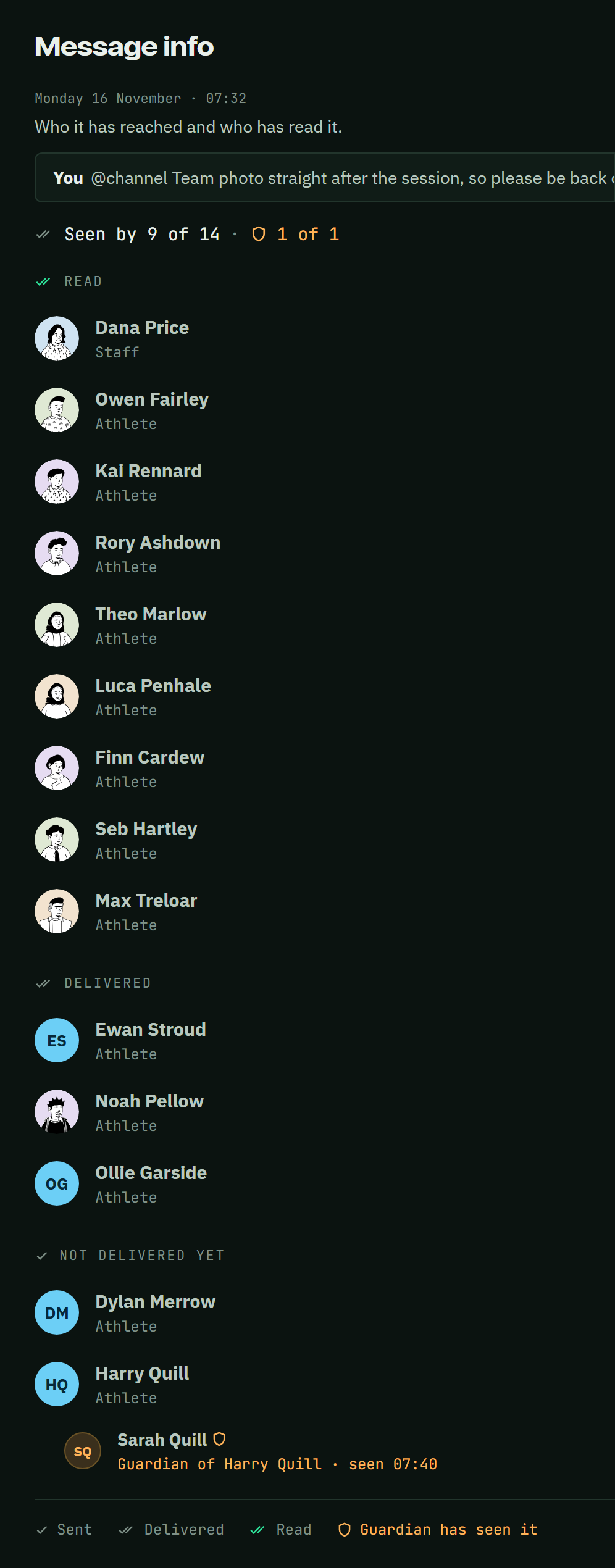
Message info: who has read it, and the guardian's read shown apart from the athlete's
Axon Chat in Axon Pulse
On the phone, athletes and staff get the same conversations in the Axon Pulse app: team channels, group chats and direct messages in one list. Files, videos, replies and @channel all come through, and new messages arrive as push notifications. Notifications to under 18s show who a message is from, never the message itself. A conversation started in HQ carries on in Pulse, and the other way round.
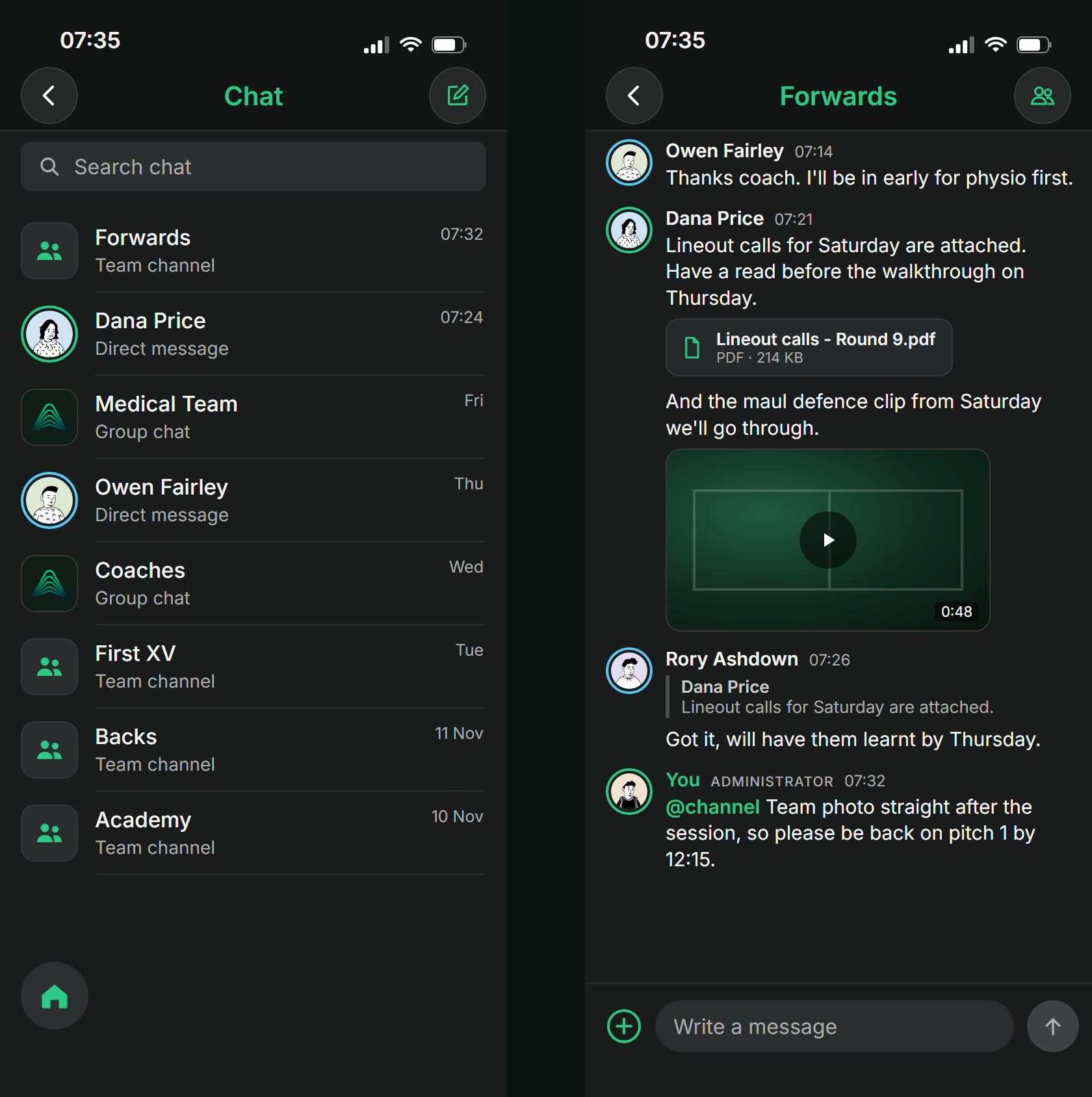
The same Forwards channel in Axon Pulse on the phone, with group chats and team channels in one list
Automated Report Refresh (New, major release)
Published reports now keep their own data up to date, on a schedule or at the press of a button. No rebuilding, no republishing.
What it does. Until now, a report published to HQ was frozen at the moment it was built. A refreshable report carries the queries that produced its data. HQ re-runs them against your organisation's data and swaps in the new numbers, while the report itself stays exactly as you designed it. Set a schedule (every few hours, daily at a set time, or weekly on chosen days, in your organisation's time zone) or press Refresh now. Everyone who opens the report sees when it was last refreshed. A run marked Up to date means the report already has the latest data available. Temporary failures are retried. If a refresh still fails, viewers keep the last good version, never half-updated data, and the publisher is notified. The refresh history shows when each run happened, what triggered it, how long it took and the result, with a filter for failures only. Refreshes run with the publisher's permissions, and whoever manages the report can switch them to their own.
Why it matters. A report is out of date the moment the next session is uploaded, and keeping it current used to mean someone rebuilding it every morning. Now you build it once. Set the GPS summary to refresh at 07:00 and the coaches open today's numbers without anyone touching it. After a late upload on match day +1, Refresh now brings it up to date rather than waiting for tomorrow. And if a source is down, the report still shows yesterday's data instead of breaking in front of the head coach. The time that went on rebuilding reports goes back into the analysis.
Where to find it. Open the report in Reports. The bar at the top shows when it was last refreshed and has Refresh now, the schedule (clock icon) and the refresh history (list icon)

The report bar: refresh status, last refreshed, Refresh now, schedule and history
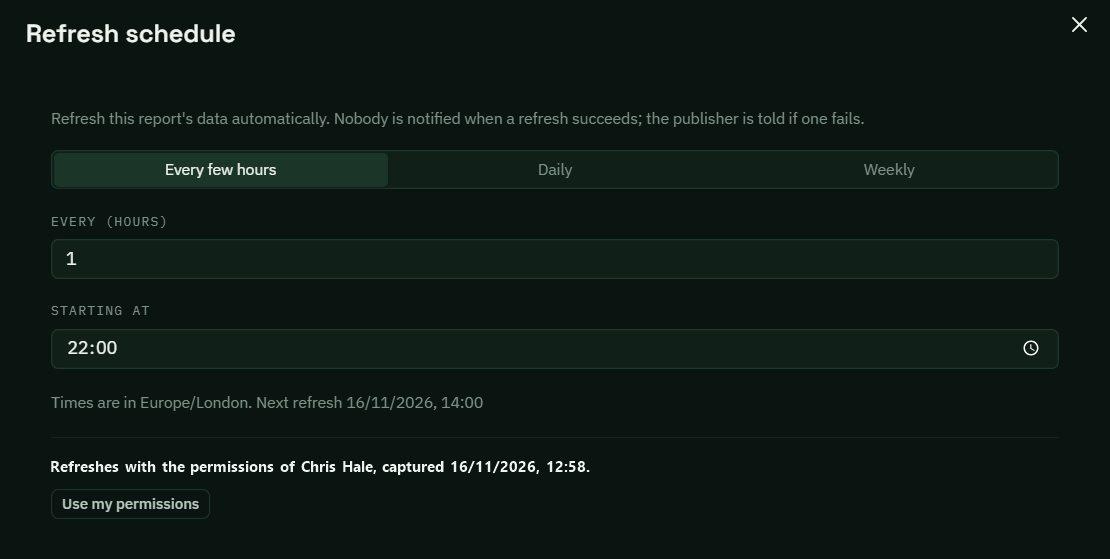
Setting a schedule: every few hours, daily or weekly, in your organisation's time zone
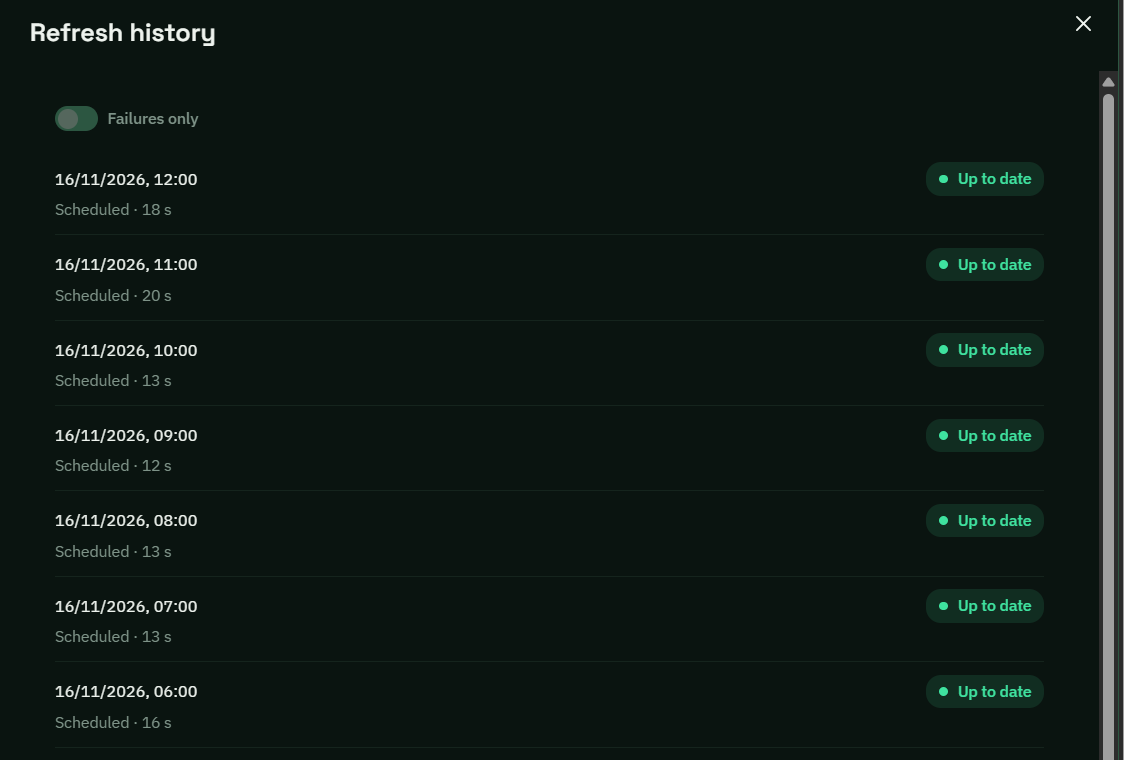
Refresh history. Up to date means the report already has the latest data available
Also in this release
Report notifications (New)
Get a notification in Axon HQ and Axon Pulse when a new or updated report is sent to you.
What it does. When a new report, or a new version of an existing one, is sent to you, a notification arrives in Axon HQ and in Axon Pulse. A routine data refresh does not send one, so an hourly schedule will not fill anyone's notifications.
Why it matters. The report you published on Monday morning gets opened on Monday morning, not when someone remembers to check.
Where it appears. Notifications in Axon HQ, and on the phone in Axon Pulse
Forms improvements (Improved)
See who has and has not responded at a glance, duplicate a form template, and tell form sends apart in My Forms.
What it does. Settings > Form Management has a single Sent tab in place of Runs and Forms, with one row per form. Open a form to see every time it was sent, then open a send to filter by Outstanding or Submitted, view a response, or remind everyone who has not filled it in. Filter by a member to see everything one person has submitted. Form templates now have a Duplicate action, which creates a draft copy with every question and setting but no people, schedule or responses. And each card in My Forms shows when it was sent, who sent it and its status, newest first.
Why it matters. Chasing wellness responses used to mean paging through rows of near-identical sends. Now it is one click to the people who have not done it and one more to remind them, before the morning meeting. Sending the same form to the Academy with one question changed no longer means editing the senior squad's version. And four Body Soreness cards that all look the same are no longer a guessing game.
Where to find it. Settings > Form Management > Sent and Form Templates. Form cards are under Forms > My Forms
Usernames on athlete and user lists (Improved)
Usernames now sit next to email addresses, with a copy button on every row.
What it does. The All Athletes and All Users lists have a Username column beside Email, and each row has a copy option. Opening a person shows both, with a copy icon beside the username.
Why it matters. When a player cannot log in to Pulse, you can give them their username straight from the list, without opening their record.
Where to find it. The Athlete Management and User Management pages, and in each person's drawer when you open them
Profile pictures for staff (Improved)
Staff can now upload their own profile picture.
What it does. Upload, replace or remove your own picture on My Profile. Where there is no picture, initials show as before.
Why it matters. With Chat arriving, it helps to see a face next to the name, especially for athletes who are new to the club.
Where to find it. My Profile
No more clearing the cache after an update (Fixed)
HQ no longer needs a cache clear to work properly after a release.
What it does. Some of you had to clear your browser cache after an update before HQ behaved properly. That has been fixed.
Why it matters. Log in after a release and it just works.
Where it appears. Throughout HQ, after each update
Questions about anything in this release? Email andy.watts@axonperform.com.
Andy Watts, Product Lead, Axon Perform