
Is Claude Dashboards Right for Sports Teams?
Not yet. But when it is, it'll suit one person's one-off question far better than a department where everyone is building from their own Claude login
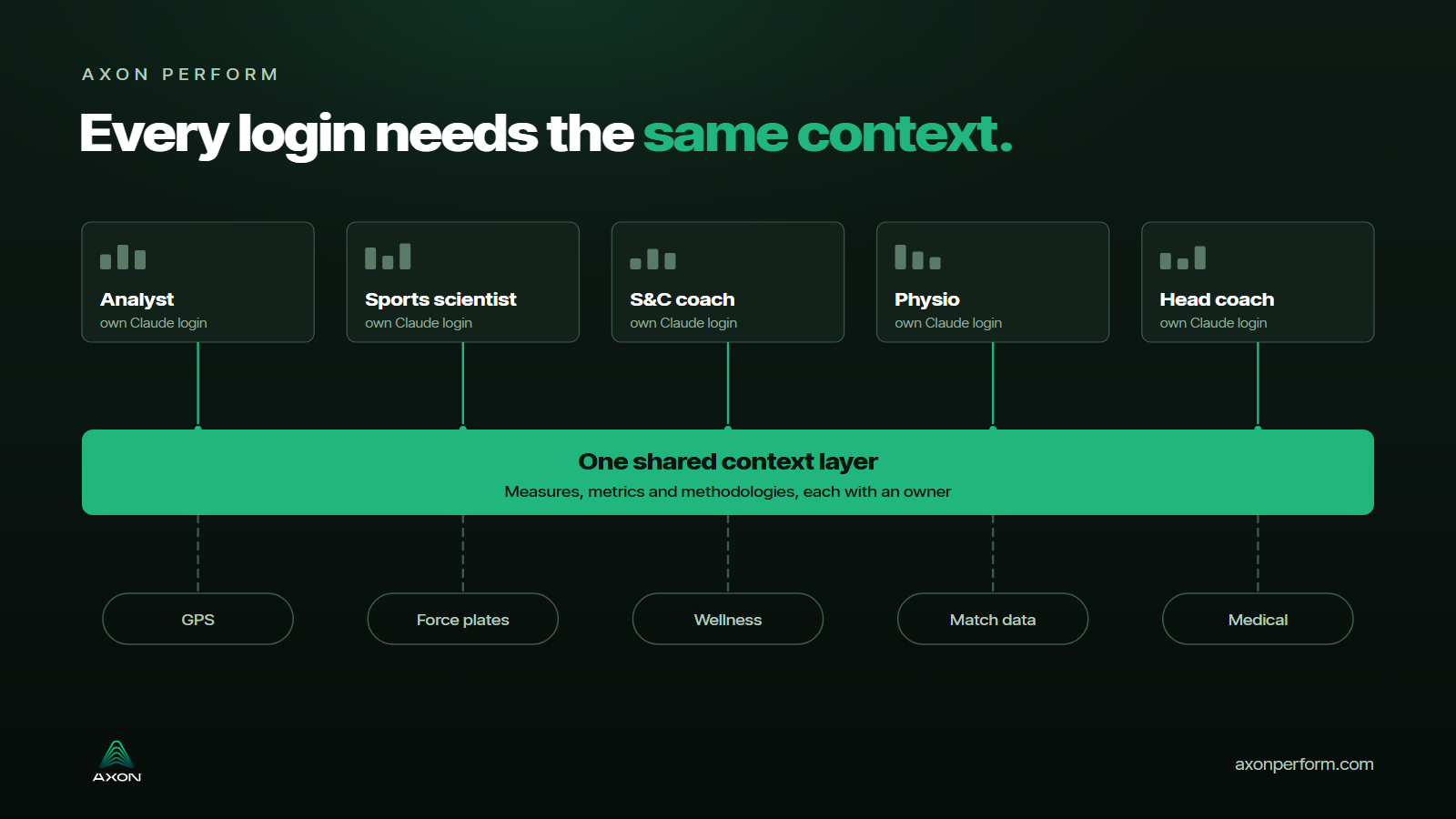
Twenty years ago I was building dashboards on data warehouses with the visualisation tools of the day, QlikView at the time, then Qlik Sense, Tableau and finally Power BI. Back then the context of the data lived in our heads. We knew what the underlying data meant, which column was the right column and how each metric was calculated, and funnily enough very little of it was ever written down. It got better slowly, as data dictionaries came in and more work went into semantic models.
Anthropic put Claude Dashboards into beta on 8th October and it takes away most of the task of building a dashboard. The theory: you ask a question in plain language and a dashboard is created. Every dashboard still relies on choices about which table, which filter, which date range and what a word like "match" means in your data.
So is it right for a sports team? Not yet, because of a sign-in problem I hit on our own data, which I'll come to. Once that's sorted it'll suit one person asking a one-off question of a simple data set. The reporting a performance department has to repeat, share and trust from one week to the next is a different job, and I don't think it's the right tool for that, mostly because of the same problem we had twenty years ago, which is where the context lives.
It's good for one person's one-off question
It's in beta on Claude's paid plans. You connect it to a data platform, Amazon Redshift, BigQuery, ClickHouse, Databricks or Snowflake, or to a connector, and Claude builds the dashboard from your question and keeps it current as the data changes, with a timestamp on each chart that tells you when it last refreshed. The connectors include MCP servers, so I tried it on ours with GPS and VALD data. In the chat it all looked fine, Claude said it could do everything and stepped through the build, and the dashboard it laid out was a sensible one: squad running load, acute to chronic flags, jump height against baseline, hamstring symmetry. The problem, though, was that the dashboard itself wanted its own sign-in to the connector, separate from the one the chat was already using. The sign-in wanted authentication in another tab every time I tried, but the dashboard never registered it, so nothing in it ever loaded. That looks like a bug in the beta to me, and until a dashboard can use the same connection as the chat, I wouldn't put it in front of a team.
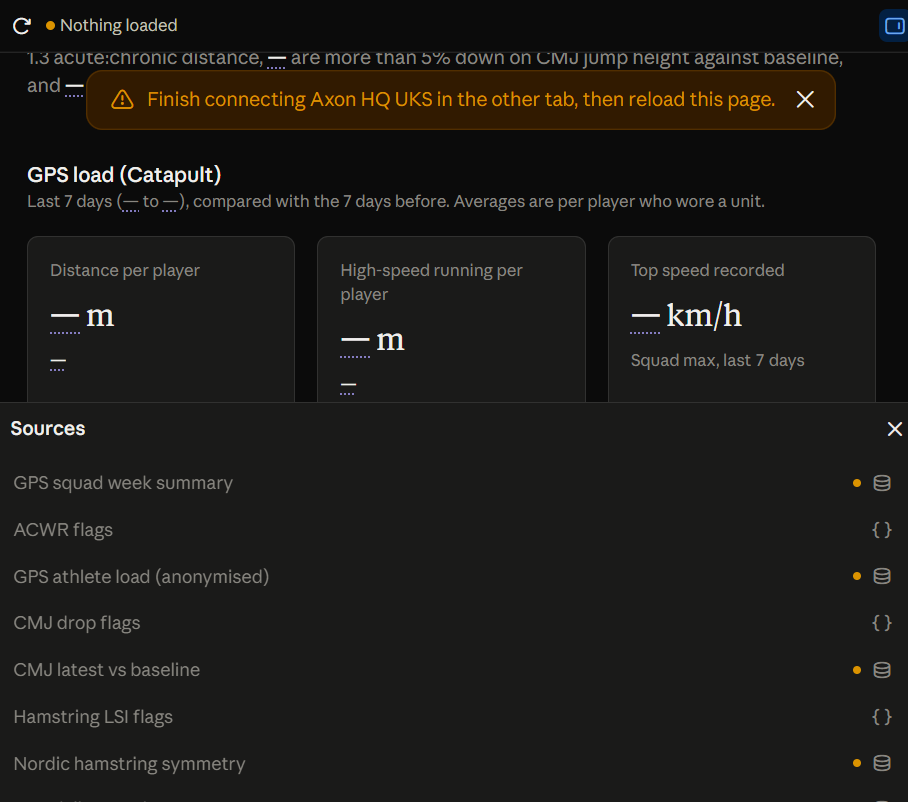
The GPS and VALD dashboard Claude built. Nothing loaded: the sign-in wanted authentication in another tab, but the dashboard never registered it. Image: Axon Perform.
The part I'd point an analyst at first is the simplest. Click any number and you see the query that produced it, or you can ask Claude to explain it. That's a quick way to check a chart, because you're reading the logic rather than trusting the picture.
In a performance department the one-off questions come up between sessions all week: who's had the biggest jump in running load since Saturday, or which players haven't been on the force plates since the international break. A dashboard is a much easier way to look at that than a spreadsheet, and those quick, exploratory questions are what Anthropic is pitching it at, with a route to send a dashboard on to a BI tool such as Hex, Grafana or Sigma when the analysis needs to go further.
I'd want everyone in the department able to ask those questions, the coaches and the physio as much as the analysts, and some of our clients already have the physio and the medical team building their own reports. Whether they should be building the reports the whole team relies on every week is another matter, possibly not. What matters more is that whoever asks gets the same answer to the same question.
Anthropic needed written guides, and someone to keep them current
Anthropic published something more useful than the launch post back in June, when its data science and data engineering team wrote up how they run their own analytics on Claude. It's the most candid account I've read of what this takes. They automate 95% of their business analytics queries through Claude at about 95% accuracy in aggregate, and what got them there were skills, folders of plain markdown that tell Claude which sources to check, in what order, and what the business means by each measure. Without them Claude never got above 21% on their internal evals.
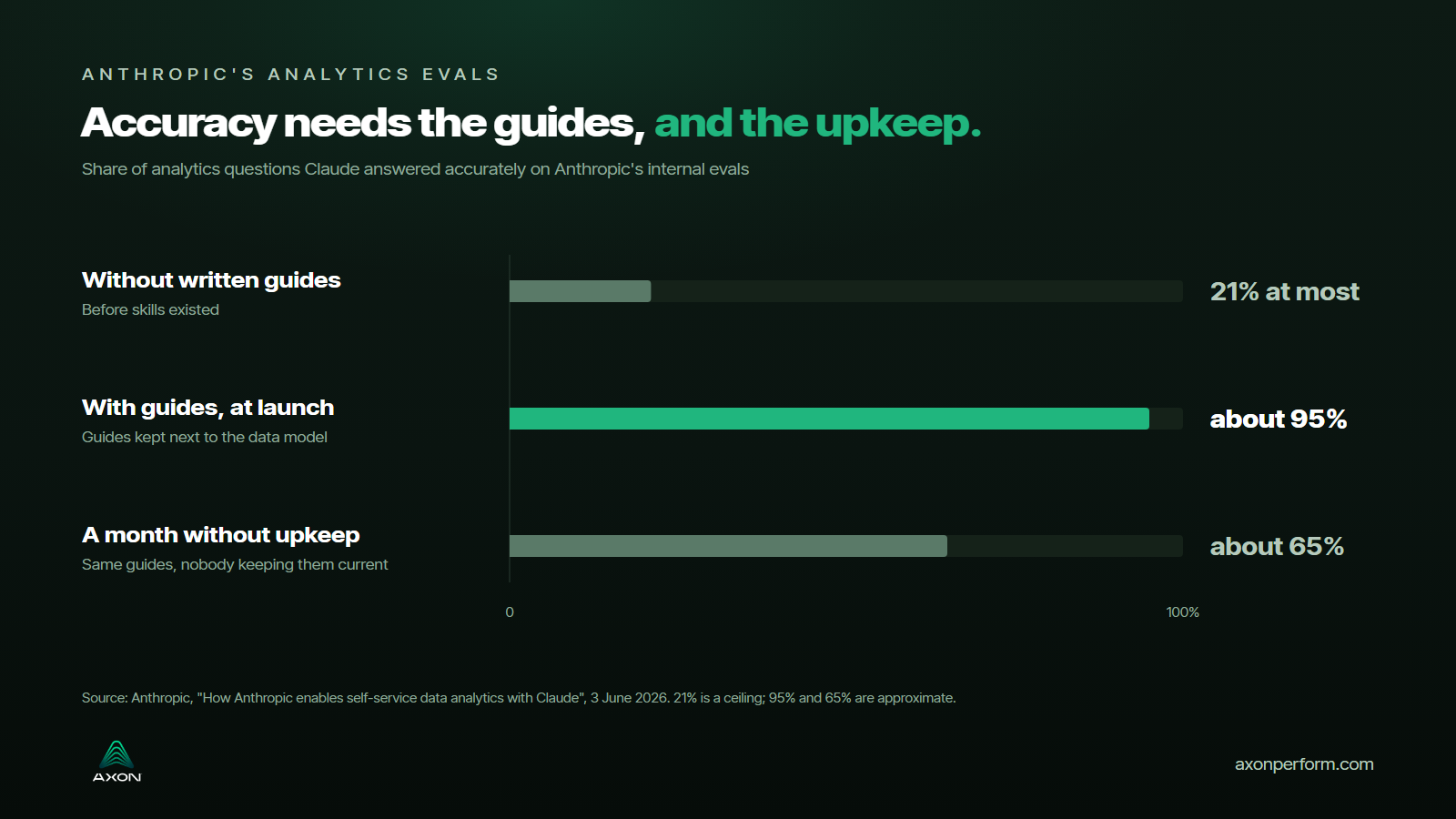
Their data model changes daily, so a skill nobody maintains is wrong within weeks, and they watched accuracy drift from about 95% at launch to about 65% over a single month. The fix was to treat the guides as engineering work. The skill files sit in the same repository as the data model, the change that alters a model also updates the guide that describes it, and roughly nine in ten of their data-model changes now carry a skill update.
They also tried letting Claude write the metric definitions straight from the raw tables. In their words it "produced plausible-looking definitions that encoded the very ambiguities we were trying to eliminate", and it scored worse than a smaller set built by hand, so their advice is to have Claude draft the documentation and a person own each definition. For self-service analytics, they say, the complexity mainly lies in the ambiguity of the data, and once that's settled the SQL becomes trivial.
Sport makes the definitions harder to keep straight
Trust in a number comes from the layer underneath the chart, the definitions, the filters and the choice of table, and in sport a lot of that is local to the club.
At one football club we work with, the tag "Game" in the GPS data sits on the academy fixtures, and the first team's matches are tagged "MD". Ask for match load with nothing written down and you'll get a clean, confident chart about the academy sides, with no error anywhere to tell you. On the same club's wellness form a 1 for sleep quality means excellent and a 7 means poor, the opposite of what you'd guess from the wording, and nothing in the table says so.
Now picture a department where the game analysts, sports scientists, performance analysts, coaches and trainers each ask from their own Claude login, wherever they happen to be working. It's the Monday after a match and the strength and conditioning coach asks for last week's high-speed running, so does the physio, so does the head coach's analyst. One dashboard counts everything above a fixed speed, one uses a percentage of each player's own max, one starts the week on Monday and one starts it the day after the game, and by the 9:15 meeting we've got three numbers for the same week and an argument about which one is right. Every one of those charts is correct on its own terms.
That was always possible with Power BI, it just took long enough that it didn't happen very often. When a chart can be created with one question, a department can make dozens a week.
An MCP connector helps, because everyone who uses it gets the same context. The club's own game model and the way it defines its performance measures usually aren't in a vendor's connector, though, and with Claude Dashboards it isn't obvious where that context would live so that every login can see it.
Repeatable reporting needs data that refreshes and one place to share it
Most of what a performance department reports on runs every week, the same load report on a Monday, the same readiness view every morning, and that's where I think Claude Dashboards is weakest. If the dashboard is built on CSV exports the data goes out of date as soon as the next session lands, and every export has to be pulled, cleaned and joined again by hand. If it's connected to an MCP, or a warehouse with the meaning of the data written down alongside it, it stays current.
Sharing is the other gap, and I think it'll be harder than it looks. A dashboard starts life in one person's Claude, and a team needs its reports in one place where the strength and conditioning coach, the physio and the head coach are looking at the same version. With medical and wellness data the permissions matter as much as the chart. The medical team should be building reports on the data they're allowed to see, and Tabular Editor found that anyone who can open a dashboard built on an extract can read the files underneath it.
Five or six vendors' connectors won't give a team one answer
More vendors are opening their data to AI assistants through MCP connectors, with their access rules still applying, so the assistant only sees what the person asking is allowed to see. For any vendor that wants to stay in a team's workflow I think that's imperative, and I'm surprised more of the sport vendors haven't done it already. Part of the reason is probably technical. When every customer's data sits in the one platform rather than in a separate environment per customer, working out who's allowed to see what through someone's own AI tool is a harder problem.
Even when they all get there, it won't solve the problem a performance department has. Most run on five or six systems, GPS, force plates, wellness, match data, medical, and the questions coaches actually ask cross them, like whether the drop in a player's jump height has anything to do with their running load or how they slept. Six vendor connectors give you six separate answers in six vendors' vocabularies. To join them the data still has to be in one place, under one set of definitions.
Very few of our clients had a warehouse of their own before they came to us. I've talked to plenty of other teams that have spent a lot of time and money building one, and a warehouse is a good thing to have, but a direct connection to it, which is what Claude Dashboards gives you, hands the model the tables and leaves it to work out what they mean. You get dashboards that each look plausible and don't agree with each other. Any team with its own warehouse should probably be looking at an MCP server of its own, so the context sits next to the data, and that's another skill set, another cost if you outsource it, and a risk if the one person who built it leaves.
Two questions decide whether it's right for your team
My guess is the teams that get the most out of Claude Dashboards will be the ones that already have solid infrastructure and their metadata in a semantic layer or an MCP, so every new chart lands on numbers that have already been agreed. For everyone else there are two questions to answer first, and neither of them is about the tool.
The first is whether everyone who'll use it can connect to one central place that holds the club's measures, metrics and methodologies, and whether Claude can see that context when it builds a chart. If the answers live in one analyst's head, which is where they lived for me twenty years ago, the dashboards will be about as accurate as Claude's guesses.
The second is who looks after it from here. Somebody, or a small group, has to own each definition, high-speed running, training load, availability, readiness, and update it when a provider changes a threshold or the club changes how it tags a session. Those definitions need writing down somewhere central, not in a notebook or one person's chat history, because staff move on, and in sport they move on often. If you can't put a name next to each one today, I'd start there, before the first dashboard.
About the author
Jon Foote is the founder and CEO of Axon Perform. He has spent twenty years in data and analytics, the last six of them inside high-performance sport, working with the All Blacks since 2020 and with national teams and clubs across rugby, football and cricket since.